Asus Refurbished Gaming
HTC Vive
Availability Statuses and Delivery
Online only
This product is only available to purchase directly through our website and the goods will be shipped directly to you. Follow the below delivery estimates for timeframes.
Online
This product is available to purchase directly through our website. Additional options for fulfillment are also available.
Free Shipping to Store(s)
This product is applicable for free shipping to our Retail Store(s). Each item will specify which store(s) are applicable. All items must be applicable for this service at checkout in order for this option to be enabled. Once the order is paid and processed the goods will be shipped to our store and the store staff will notify you once it is ready to collect. Shipment times are generally 1-3 Business Days to our store.
In Stock in Store(s)
This product is in our Retail Store(s) for immediate pickup. Each individual store will be listed with availability. Simply come into our store to make a purchase or place an order online. All orders are pgenerally processed within 1-2 Hours.
Out of Stock
This product is currently out of stock. Contact us for a specifc ETA for product arrival. General stock timeframes are 4-6 weeks from time of over but may be affected due to supply constraints or the global pandemic.

Delivery Timeframe
In-Stock Items
Metro - 1-3 Business Days
Rural, WA, TAS, NT - 7 Business Days
Special Orders
Approximately 4 - 6 Weeks. We recommend contacting us for a firmer timeframe for the specific product.
Consumables Finder

To find the right Consumables for your Printer use the search below with your Printer Model or Cartridge Part # .

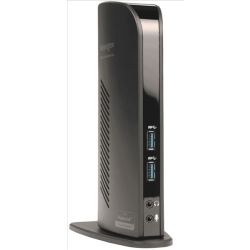
[33972] Kensington 33972 USB3.0 Docking Station W Dual DVI/HD

Kensington 33972 USB3.0 Docking Station W Dual DVI/HD Click image for larger image.

Product may vary from image. Rely only on description for purchasing decisions.
shadow
Our Price:
$153.23
(Inc. GST)
Availability:

Est. Delivery:
1-3 days
Brand:
Man. Part #:
33972
Our Part #:
33972
Calculate Delivery Cost
Postcode:
Please enter a postcode to caculate shipping prices.
shadow
Product Quantity:
Kensington SD3500v, Wired, USB 3.2 Gen 1 (3.1 Gen 1) Type-A, 10,100,1000 Mbit/s, Black, 5 Gbit/s, 2K Ultra HD

Connect two additional screens with 1 DVI Out & 1 HDMI Out

Expand your workspace by adding additional monitors. Connect your DVI monitor to the DVI port or use the included DVI>VGA adapter to connect your VGA monitor. If you've got an HDMI monitor, you can connect directly into the HDMI out port. You can also connect a second HDMI monitor to the DVI port using the included DVI>HDMI adapter. You can run both the DVI and HDMI ports simultaneously.

Extend Mode

Extend your workspace by making it bigger. Extend mode allows you to share your whole desktop across multiple screens. Ideal for improved productivity by working with, and viewing, multiple applications at the same time.

Clone Mode

Allows you to replicate the same content on your second display as you do on your master display.

2 Front USB 3.0 Ports

Two fast and powerful USB 3.0 ports are positioned on the front of the dock for when you want to charge a phone or tablet, or transfer data from another device. Headphone and microphone input ports are also conveniently within reach when they’re needed.

4 Rear USB 2.0 Ports

Connect all your peripherals with 4 USB ports. These ports are strategically located on the back of the docking station to help keep your printer, keyboard and mice cables or wireless dongles hidden from view.

Display Settings Software

Our intuitive display management console sits on your applications bar and allows you to easily switch between display modes, change the master monitor or adjust alignment and position of your screens. Our corporate install support provides for mass installation via the Microsoft® server.

Add more screens

You can hook up even more monitors using a multi-display adapter, which is available separately. These connect into one of the six USB ports and can be used with DVI or VGA monitors.

Free Kensington DockWorks™ Software

Enables the best connection, performance and security from your Kensington dock.

Ultra-thin laptops and 2-in-1 convertibles like the Microsoft Surface Pro offer great mobile productivity and sleek good looks. But that also means they usually come up short on connectivity ports. As a result, you’re constantly plugging and unplugging peripherals. That’s where the SD3500v USB 3.0 Universal Docking Station comes in. It turns one USB port into six so you have access to all your peripherals, including keyboard, mouse, printer and external hard drive. And with dual HD video output, you can add two external monitors to boost productivity. The dock’s two USB 3.0 ports support super-speed data transfer of up to 5 Gbps.
Ports & interfaces
Connectivity technology
The technology that enables connectivity of the device, e.g. wired or wireless.
Wired
Host interface
Interface that enables a host controller to communicate with a driver.
USB 3.2 Gen 1 (3.1 Gen 1) Type-A
USB 2.0 ports quantity
Number of USB 2.0 ports (connecting interfaces) in the device. USB 2.0 was released in April 2000 (now called "Hi-Speed"), adding higher maximum signaling rate of 480 Mbit/s (effective throughput up to 35 MB/s or 280 Mbit/s), USB 2.0 ports are usually black.
4
USB 3.2 Gen 1 (3.1 Gen 1) Type-A ports quantity
2
Number of USB ports with PowerShare support
2
USB Power Delivery
N
HDMI ports quantity
The number of sockets (ports) for HDMI connections. HDMI (High-Definition Multimedia Interface) is a compact audio/video interface for transferring uncompressed video data and compressed/uncompressed digital audio data from a HDMI-compliant device ("the source device") to a compatible computer monitor, video projector, digital television, or digital audio device. HDMI is a digital replacement for existing analog video standards.
1
HDMI version
1.2
DVI-I ports quantity
This is the amount of DVI-I interfaces. Digital Visual Interface (DVI) is a video display interface developed by the Digital Display Working Group (DDWG). The digital interface is used to connect a video source to a display device, such as a computer monitor. DVI-I is DVI integrated, which means it can support digital and analog.
1
Microphone in
The socket where a microphone is connected to the device.
Y
Headphone outputs
Number of sockets /ports where headphones are connected.
1
DC-in jack
The socket/plug where the DC electricity supply connects to the device.
Y
Network
Ethernet LAN
An Ethernet LAN (Local Area Network) interface is present, for a wired conection via a cable.
Y
Ethernet LAN (RJ-45) ports
Number of Ethernet LAN (RJ-45) ports (connecting interfaces) in the device. Ethernet LAN (RJ-45) ports allow a computer to connect to the ethernet.
1
Ethernet LAN data rates
The different speed levels of the Ethernet LAN connection.
10,100,1000 Mbit/s
Performance
Card reader integrated
The device includes a card reader e.g. a card reader in the disk bay of a computer or thin client to permit log-on using smart/pin cards.
N
Data transfer rate
Rate at which data can be transferred. Usually expressed in units per second. May vary with network configurations.
5 Gbit/s
HD type
Type of supported High Definition (e.g. Full HD, 4K Ultra HD).
2K Ultra HD
Maximum digital resolution
1920 x 1200 pixels
Number of displays supported
The number of displays that can be used with this product.
2
Cable lock slot
Holes on the edge of devices through which a cable lock can be passed, so the device can be locked to a desk etc.
Y
Cable lock slot type
Kensington
Product colour
The colour e.g. red, blue, green, black, white.
Black
Software
Windows operating systems supported
Windows vesions wich can be used with the device.
Windows 10,Windows 10 Education,Windows 10 Education x64,Windows 10 Enterprise,Windows 10 Enterprise x64,Windows 10 Home,Windows 10 Home x64,Windows 10 IOT Core,Windows 10 Pro,Windows 10 Pro x64,Windows 10 x64,Windows 7,Windows 7 Enterprise,Windows 7 Enterprise x64,Windows 7 Home Basic,Windows 7 Home Basic x64,Windows 7 Home Premium,Windows 7 Home Premium x64,Windows 7 Professional,Windows 7 Professional x64,Windows 7 Starter,Windows 7 Starter x64,Windows 7 Ultimate,Windows 7 Ultimate x64,Windows 7 x64,Windows 8,Windows 8 Enterprise,Windows 8 Enterprise x64,Windows 8 Pro,Windows 8 Pro x64,Windows 8 x64,Windows 8.1,Windows 8.1 Enterprise,Windows 8.1 Enterprise x64,Windows 8.1 Pro,Windows 8.1 Pro x64,Windows 8.1 x64
Mac operating systems supported
Mac operating systems e.g. OS X can be used with the device.
Mac OS X 10.14 Mojave,Mac OS X 10.15 Catalina
Packaging data
Quantity per pack
1 pc(s)
Other features
Compatible operating systems
List of desktop operating systems tested as compatible with this product.
macOS 10.14 or above; Windows 7 or above
Manufacturer Info
Authorised Apple Reseller