

To find the right Consumables for your Printer use the search below with your Printer Model or Cartridge Part # .
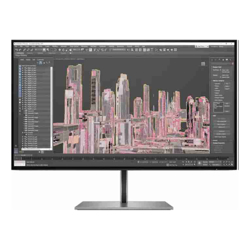 Click image for larger image.
Universally consistent colors
Out of the box, you get remarkable color accuracy from screen to screen[1]. Achieve precise, vibrant detail with 99% sRBG color gamut and Quad HD resolution.
Design pushed to the edge
Meticulously crafted with a razor-thin profile and frameless design, this stunning 27" (68.58 cm) diagonal screen monitor effortlessly powers your PC or Mac®. Get ultimate comfort with 4-way ergonomic adjustability.
Always on low blue light
Experience exceptional vibrancy with HP Eye Ease, the always on low blue light filter that reduces blue light exposure with zero impact to true color accuracy.
Optional integrated audio
Easily attach the Z Display Conferencing Speaker Bar for stereo quality audio and dual microphones. [8]
3-year limited warranty
The assurance of HP's three-year standard limited warranty.
HP Zero BrightDot Guarantee
Even if just a third of a pixel fails or is stuck in one position, HP will replace the entire display. [7]
Easily mount a Mini
Mount your HPZ2 Mini or HP Desktop Mini directly to the monitor for a clean workspace. [6]
All the ports you need
Connect to a Workstation, a PC and additional displays.
Easily connect multiple monitors
Declutter your desk and connect a series of displays by daisy chaining with a single DisplayPort⢠cable. [5]
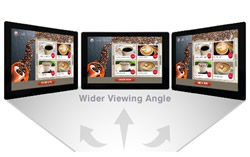
Make the most of In-Plane Switching (IPS) technology in the display panel to get faster response times, wider viewing angles, better color reproduction and sunlight visibility, and a longer lifespan.

A popular choice of the larger widescreen monitors, a 27" monitor is a great size for productivity and gaming without a significant increase in cost when compared to larger widescreen and ultrawide options.

Strike the right balance between physical space and screen real estate with 16:9 aspect ratio, the most widely used across widescreen monitors.

Get the vertical viewing experience with a 90 degree pivot. Portrait mode is perfect for tasks like reading PDFs or following team conversation threads, allowing you to boost your productivity through a better visual focus in work, study, and creative environments.

Set up your monitor at the perfect viewing angle with a tiltable stand.

Take advantage of the most commonly used media output interface in modern laptops and desktops with a direct HDMI input on the monitor. No adapters needed.

Take advantage of the most commonly used media output interface in modern business grade laptops and desktops with a direct Display Port input on the monitor.


