

To find the right Consumables for your Printer use the search below with your Printer Model or Cartridge Part # .
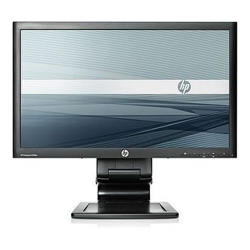 Click image for larger image.
The Advantage Series HP Compaq LA2206x offers a super-thin, soft black 21.5-inch diagonal widescreen LCD monitor that brings full HD images to life, while LED backlight technology helps improve recyclability and advanced adjustability helps enhance productivity
| System features | |
| Display size | 21.5" |
| Display resolution | 1920 x 1080 |
| Pixel pitch | 0.248 mm |
| Brightness | 250 cd/m² |
| Contrast ratio | 1000:1 static; 1000000:1 dynamic |
| Viewing angle | 170° horizontal; 160° vertical |
| Input signal | 1 VGA; 1 DVI-D; 1 DisplayPort |
| Display moving angle | Tilt: -5 to +30°; Swivel: ±360° |
| Faceplate treatment | Anti-static; Anti-glare; Asset Control; Language selection; Plug and Play; User programmable; On-screen controls |
| I/O ports | 2 USB Hub |
| Physical security | Security Lock-Ready |
| Dimensions and Weight | |
| Product weight | 6.10 kg |
| Dimensions (WxDxH) | 51.80 x 4.75 x 31.50 cm |
| Dimensions (WxDxH) w/ stand | 51.8 x 22.73 x 33.33 cm |
| Power and operating requirements | |
| Power Requirements | Input voltage: 100 to 240 VAC |
| Power consumption | 36W maximum; 28W typical |
| Power Consumption, Standby | <0.5W |
| Operating Temperature Range | 5 to 35°C |
| Operating Humidity Range | 20 to 80% RH |
| What's included | |
| Warranty features | Protected by HP Services, including a 3 years parts, 3 years labour, and 3 years onsite service (3/3/3) standard warranty. Terms and conditions vary by country. Certain restrictions and exclusions apply. |

The smallest of the modern widescreen monitor sizes, a 22" monitor is perfect if you want something substantially larger than a laptop screen but have limited space or are working with a tight budget. 22" monitors are good for a dual screen setup in tight spaces as anything larger than 24" requires considerably more neck movement.

Strike the right balance between physical space and screen real estate with 16:9 aspect ratio, the most widely used across widescreen monitors.

Take advantage of the clarify from digital video signal input with the tried and trusted DVI interface.
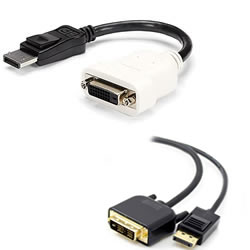
Consider an inexpensive DP-to-DVI Adapter or HDMI-to-DVI Adapter to convert from a DisplayPort or HDMI output on your device.
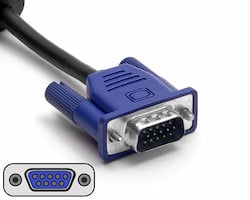
Take advantage of the widely used VGA video input interface for connecting to a multitude of devices from servers, to desktops, laptops and KVM switches.

Skip the clutter of numerous cords on your desk while maintaining connectivity and accessibility with an integrated USB hub on your monitor.


