

To find the right Consumables for your Printer use the search below with your Printer Model or Cartridge Part # .
 Click image for larger image.

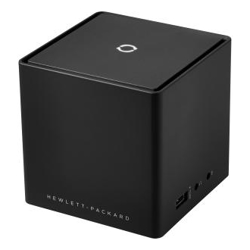
Expand your HP Elite X2 workspace with the HP Advanced Wireless Docking Station, which enables seamless connectivity through WiGig technology. Get desktop productivity from your mobile solution in an instant. After a one-time on-screen set up, your connected devices are ready to go as soon as your tablet is in range. Compatible with the HP Elite X2 1011 G1, 1012 G1, 1012 G2-all three models require the optional installed Intel Tri-Band Wireless AC with WiGig Combo card.
The HP Advanced Wireless Docking Station simplifies the process of connecting an HP notebook or tablet to a power supply, a wired network, and peripherals.
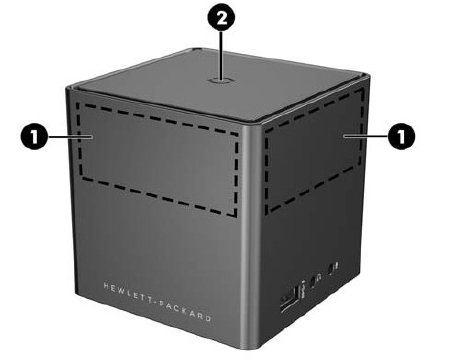
Top and front components
Antennas and a pairing button are located on the top and front of the docking station.
1. Antennas
Send and receive wireless signals to communicate with WiGig networks.
2. Pairing button/Docking station light
Press button to complete pairing if necessary.
Docking station light status:
Solid amber—Docking station is on and not paired to a device.
Pulsing white—Docking station is pairing to a device.
Solid white—Docking station is paired.
Flashing amber—There is a hardware error.
Flashing amber and white—There is a firmware upgrade.
Rear components
The power button, reset button, and several ports are located on the back of the docking station.
Power button: Slide to turn the docking station on and off.
Reset button: Press to restore default settings.
USB 3.0 ports (3): Connect an optional USB device, such as a keyboard, mouse, external drive, printer, scanner or USB hub.
Dual-Mode DisplayPort: Connects an optional digital display device, such as a high-performance monitor or projector.
RJ-45 (network) jack: Connects a network cable.
External monitor port: Connects an external VGA monitor or projector.

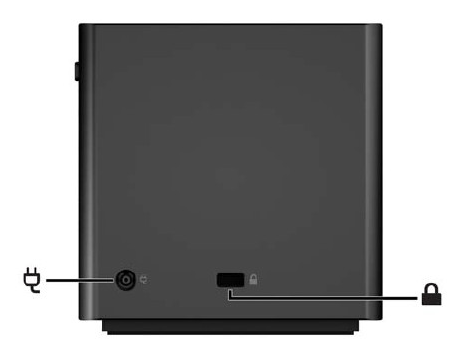
Left components
The power connector and security cable slot are located on the left side of docking station.
Power connector: Connects an AC adapter.
Security cable slot: Attaches an optional security cable to the docking station.
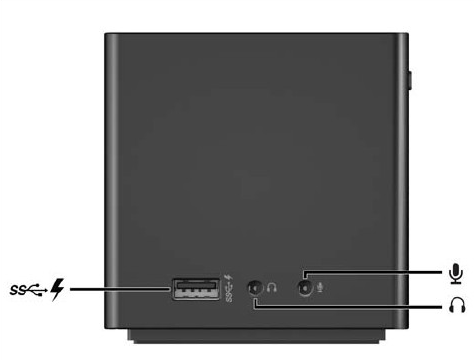
Right components
A USB charging port and audio jacks are located on the right side of the docking station.
USB 3.0 charging (powered) port: Connects an optional USB device, such as a keyboard, mouse, external drive, printer, scanner or USB hub. Standard USB ports will not charge all USB devices or will charge using a low current. Some USB devices require power and require you to use a powered port.
Audio-out (headphone) jack: Connects optional powered stereo speakers, headphones, earbuds, a headset, or a television audio cable.
Audio-in (microphone) jack: Connects an optional computer headset microphone, stereo array microphone, or monaural microphone.

Why pay more for new when you can go refurbished and save? With savings of up to 70% on Laptops, Desktops, Servers, Networking and even Apple you would be crazy to think twice. With no significant advances in computer technology in the last 3-5 years there's never been a better time to save by buying refurbished.
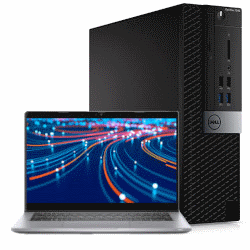
All refurbished units we sell are rigorously tested and cleaned to ensure they are in A-Grade condition and are ready to use straight out of the box. Although some units may have some minor cosmetic blemishes and imperfections such as minor scratches or other minor surface imperfections they have all been tested and are guaranteed to work like new.

We stand by our products and back any refurbished equipment we sell with a 12-Month Warranty (unless otherwise specified). Our warranty covers any hardware faults that may arise within this period.
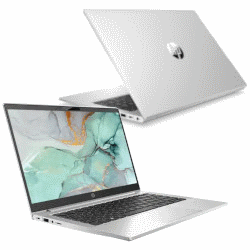
All refurbished units we sell are from the tough commercial grade product lines from the leading manufacturers including Dell, HP and Lenovo. When sold new these units have premium pricing reflectively of their superior build quality.
Most refurbished units we sell come from large enterprise and government departments and have had a good life and have been well looked after. Due to this, the longevity of a refurbished commercial units is often higher than that of consumer grade equipment.
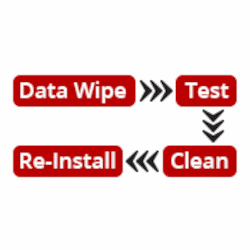
All our refurbished products undergo a rigorous quality assurance procedure. This involves the units being wiped of sensitive data, tested, cleaned and re- installed with a fresh genuine copy of the operating system to match the attached Microsoft Certificate of Authenticity (COA). This ensures that the unit you receive is ready to plug in, turn on and use straight out of the box.
We are a Microsoft Registered Refurbisher so you can have peace of mind that any refurbished unit you purchase from us will meet your expectations and be up to the task.


