

To find the right Consumables for your Printer use the search below with your Printer Model or Cartridge Part # .
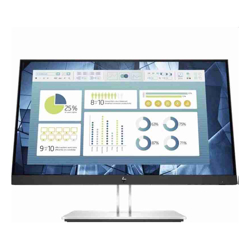 Click image for larger image.
Total comfort begins with HP Eye Ease
Keep your eyes comfortable through the work day with HP Eye Ease, our first built-in, always-on blue light filter that presents your vivid content with zero impact on your color accuracy, no OSD required.
Personalize your view
Never lose a moment of productivity with 4-way monitor adjustability that lets you find your sweet spot, a 3-sided micro-edge, flicker-free 21.5" (54.61 cm) diagonal screen that reveals more of your work, and Full HD resolution for crisp visuals from any angle.
Responsibly made
Energy efficiency is built into every ENERGY STAR® certified, EPEAT® 2020 registered[3], and low halogen[4] display. We go one step further with 100% recyclable packaging thatâs easily accepted by recycling facilities.
Personalize and help protect your monitor
Customize your monitor and help deter its theft with easy, intuitive HP Display Center software that lets you tailor your settings, partition screens, and even dim the screen if your monitor is disconnected without approvalâall through the host PC. [6]
Complete the picture
Customize a total solution with options like the HP S101 Speaker Bar, which attaches easily to the lower bezel to add stereo audio on the monitor. [5]
Take your PC off the desk
Create an efficient, compact, solution when you mount your HP Desktop Mini PC directly on the column stand using the optional HP B300 PC Mounting Bracket. [5]
Responsibly made
Energy efficiency is built into every ENERGY STAR® certified, EPEAT® 2019 registered, and low halogen display. We go one step further with 100% recyclable packaging thatâs easily accepted by recycling facilities. [3,4]
Find your comfort zone
Work comfortably with adjustable tilt, height, and swivel settings. Use pivot rotation to conveniently customize portrait or landscape views on multiple monitors. [2]
Experience simple, convenient connectivity
Connect to your most frequently-used devices with VGA, HDMI, and DisplayPortâ¢. Add up to four of your USB accessories right at the monitor with the integrated USB 3.2 hub.
We have your back
Rest assured that this monitor has been vigorously tested for compatibility across HP PCs and workstations. Itâs also supported by our three-year standard limited warranty. Extend your protection to cover accidents, next-business day needs, and more with optional HP Care Pack services. [7]
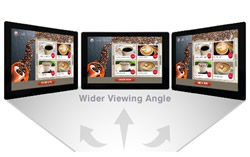
Make the most of In-Plane Switching (IPS) technology in the display panel to get faster response times, wider viewing angles, better color reproduction and sunlight visibility, and a longer lifespan.

The smallest of the modern widescreen monitor sizes, a 22" monitor is perfect if you want something substantially larger than a laptop screen but have limited space or are working with a tight budget. 22" monitors are good for a dual screen setup in tight spaces as anything larger than 24" requires considerably more neck movement.

Take advantage of the most commonly used media output interface in modern laptops and desktops with a direct HDMI input on the monitor. No adapters needed.
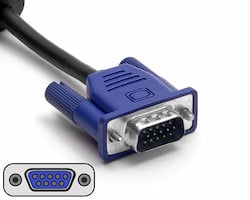
Take advantage of the widely used VGA video input interface for connecting to a multitude of devices from servers, to desktops, laptops and KVM switches.

Take advantage of the most commonly used media output interface in modern business grade laptops and desktops with a direct Display Port input on the monitor.

Skip the clutter of numerous cords on your desk while maintaining connectivity and accessibility with an integrated USB hub on your monitor.


