

To find the right Consumables for your Printer use the search below with your Printer Model or Cartridge Part # .
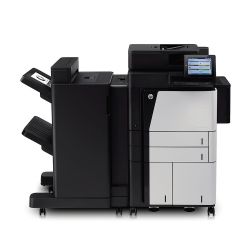 Click image for larger image.
Give workgroups the speed they need.
Scan two-sided documents in a single pass with super-fast scan speeds. HP EveryPage allows employees to scan without worry and detect potential errors or missed pages on the spot â even when the weight, size or condition of pages varies.
Enter data more quickly and accurately, using the pull-out keyboard.
Make your scanned documents easy to locate and retrieve. Create easily searchable scanned files, using built-in optical character recognition (OCR) software.
Easily scan and send documents to Microsoft®SharePoint® in one step.
Keep your business moving.
Make it easy to be efficient: preview and edit scans, adjust images and launch standard processes, all at the 20.3 cm (8-inch) colour touchscreen.
Tackle high volume printing: load the MFP with a paper capacity of up to 4,600 sheets and high-capacity Original HP cartridges, and let it go to work.[3]
Add finishing touches â give employees the tools to organise documents faster and more conveniently. Staple, stack, fold and punch holes with the MFP's built-in finishing options[4].
Simplicity all around â make it easy for all to print with one common driver, the HP Universal Print Driver (UPD), for all HP devices.[5]
Enjoy easy and secure mobile printing.[1]
Enable secure peer-to-peer direct-access mobile printing without connecting to the corporate network with HP Wireless Direct printing technology.[1]
Enjoy mobile printing at a touch: enable optional touch-to-print and touch-to-authenticate convenience from mobile devices.[2]
Print at work, home or on the go from your smartphone, tablet and notebook with HP ePrint[6] and AirPrintâ¢[7].
Pull print jobs from your pocket â walk up and print or scan from your USB drive.


