Asus Refurbished Gaming
SteelSeries Siberia
Availability Statuses and Delivery
Online only
This product is only available to purchase directly through our website and the goods will be shipped directly to you. Follow the below delivery estimates for timeframes.
Online
This product is available to purchase directly through our website. Additional options for fulfillment are also available.
Free Shipping to Store(s)
This product is applicable for free shipping to our Retail Store(s). Each item will specify which store(s) are applicable. All items must be applicable for this service at checkout in order for this option to be enabled. Once the order is paid and processed the goods will be shipped to our store and the store staff will notify you once it is ready to collect. Shipment times are generally 1-3 Business Days to our store.
In Stock in Store(s)
This product is in our Retail Store(s) for immediate pickup. Each individual store will be listed with availability. Simply come into our store to make a purchase or place an order online. All orders are pgenerally processed within 1-2 Hours.
Out of Stock
This product is currently out of stock. Contact us for a specifc ETA for product arrival. General stock timeframes are 4-6 weeks from time of over but may be affected due to supply constraints or the global pandemic.

Delivery Timeframe
In-Stock Items
Metro - 1-3 Business Days
Rural, WA, TAS, NT - 7 Business Days
Special Orders
Approximately 4 - 6 Weeks. We recommend contacting us for a firmer timeframe for the specific product.
Consumables Finder

To find the right Consumables for your Printer use the search below with your Printer Model or Cartridge Part # .

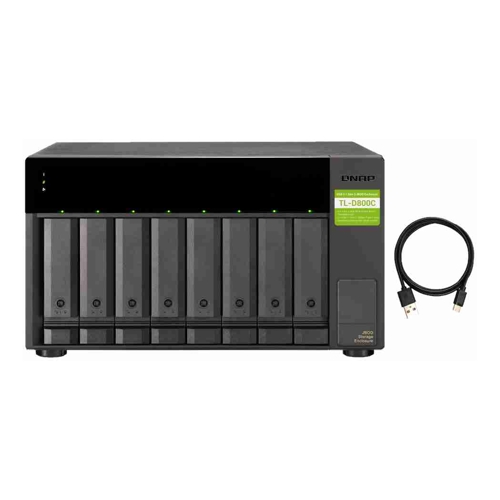
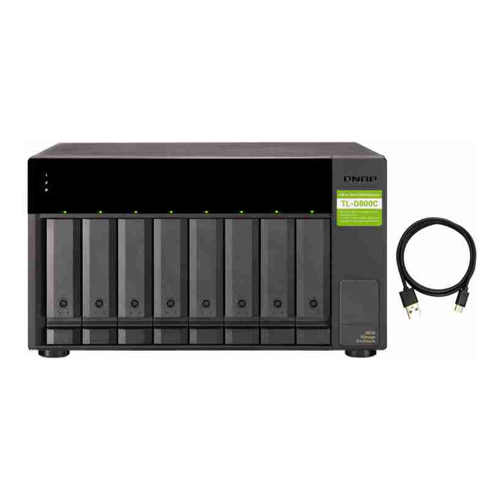
[TL-D800C] Qnap TL-D800C 8-bay desktop USB-C 3.1 Gen2 10Gbps JBOD expansion unit with a 1-meter USB-C to USB-A 3.1 Gen2 cable./2 Years WTY

Click image for larger image.

Product may vary from image. Rely only on description for purchasing decisions.
shadow
Our Price:
$1,068.96
(Inc. GST)
Availability:

Est. Delivery:
1-3 days
Brand:
Man. Part #:
TL-D800C
Our Part #:
TL-D800C
Calculate Delivery Cost
Postcode:
Please enter a postcode to caculate shipping prices.
shadow
Product Quantity:
QNAP TL-D800C, HDD/SSD enclosure, 2.5/3.5", Serial ATA II, Serial ATA III, 6 Gbit/s, Hot-swap, Black, Grey

The TL-D800C JBOD storage enclosure allows you to back up and expand your QNAP NAS and computers (supports Windows and Mac). The TL-D800C features eight 3.5-inch SATA 6Gb/s drive bays with USB 3.2 Gen 2 (10 Gbps) Type-C connectivity to provide a fast and smooth expansion solution.

Flexible storage configuration and management
The TL-D800C provides software-controlled configurations for greater management flexibility. Users can configure RAID and monitor disk health using the QTS / QTS hero Storage & Snapshots Manager on a QNAP NAS, or by using the QNAP JBOD Manager utility on their computer.

What you need to know
You can connect your TL-D800C to Windows, Mac, and Ubuntu computers through the USB interface and use built-in utility to manage the RAID configuration.

Intelligently monitor JBOD enclosure status on PC and servers with QNAP JBOD Manager
The QNAP JBOD Manager is a desktop utility for monitoring the TL-D800C on Windows and Mac computers. You can quickly obtain and view information about the JBOD status, health, fan rotation speed, and check for firmware version updates. All device events are recorded, and QNAP JBOD Manager will automatically send system alert notifications to your desktop.

JBOD migration speeds up remote file transfers
Migrating a large number of small files or a single large data file by network environment can be time-consuming and consume significant network bandwidth that causes decreased work efficiency. The TL-D800C supports remote file transfer. All you have to do is set up the RAID configuration and store a large number of files. Then you can move the TL-D800C to another place and connect it with the computer or NAS to experience the device’s simple plug and play feature and fast data migration.

Use TL-D800C as a high-capacity disk drive reader by setting up single disk mode
You can treat each disk in your TL-D800C as an individual storage space, and also use it as a removable drive. It can function like a high-capacity disk drive reader. When one of disk reaches data storage limitation, you can remove it and put it into a dry box. Then swap a different disk into the TL-D800C empty drive slot. After that, you can install the disk that reached full data capacity into the TL-D800C and connect it with a computer or NAS for direct file access.

Versatile usage scenarios to meet storage expansion needs
The TL-D800C meets many storage expansion requirements for the home and office. Below is a list of potential usage scenarios:

Scenario 1: Expand your NAS capacity
The TL-D800C provides an alternative method for users to expand their NAS storage capacity. By connecting the TL-D800C to their NAS and using the Storage & Snapshots Manager in QTS or QTS hero, users can easily configure and manage their storage expansion. The TL-D800C supports a variety of QNAP NAS storage and file management functions, allowing users to build storage pools, finding files with Qsirch, and organizing files with Qfiling.

Scenario 2: External storage for your NAS
You can use the TL-D800C to expand your NAS storage. You can select disks to create storage pools for expanding your NAS capacity, or you can treat each disk as an individual external storage space and use it as a removable drive for greater flexibility. Regardless of the mode you use, you can always use Storage & Snapshots Manager in QTS or QTS hero to set up and manage your TL-D800C and use hard drive S.M.A.R.T. and Notification Center to check disk status anytime and anywhere.

Scenario 3: Expand the storage space of your Windows, Mac, and Ubuntu computer
You can use your TL-D800C with Windows, Mac, and Ubuntu computers to expand more storage space. You can set up the RAID configuration of your TL-D800C to further secure data protection. Moreover, you can also use the single disk mode and format with the exFAT file system for more convenient access and sharing of files between Windows® and Ubuntu® computers.

High-speed USB transfer
TThe TL-D800C features high-speed USB 3.2 Gen 2 Type-C connectivity and built-in USB Attached SCSI Protocol (UASP) to provide convenient fast file sharing and intensive data transfer. The TL-D800C not only provides you higher file transfer performance than traditional USB interfaces but offers a more cost-effective option than REXP SAS JBOD.
Storage
Number of storage drives supported
How many storage drives can be fit into the product at once.
8
Storage drive size
The size of the storage drive, given in inches ('').
2.5/3.5"
Supported storage drive interfaces
Serial ATA II, Serial ATA III
Hot-swap
Y
Ports & interfaces
USB connectivity
The product has USB connector.
Y
USB version
Universal Serial Bus (USB) is an industry standard developed in the mid-1990s that defines the interface used for connection, communication and power supply between computers and electronic devices. Every new version - for example 1.1, 2.0, 3.0 - is much faster than the previous one.
3.2 Gen 2 (3.1 Gen 2)
USB connector type
The type of USB connector/port that this product has.
USB Type-C
USB connector gender
Female
USB ports quantity
1
Design
Product type
The sub-category of the product.
HDD/SSD enclosure
Product colour
The colour e.g. red, blue, green, black, white.
Black, Grey
LED indicators
Fan fail, HDD, Link
On/off switch
The button which is pressed to switch the device on or off.
Y
Number of fans
The quantity of fans (apparatus with rotating blades that creates a current of air for cooling or ventilation).
2 fan(s)
Fan diameter
The size of the fan, measured by the distance from one side of the fan to the other, via a straight line going through the middle of the fan.
12 cm
Performance
Data transfer rate
Rate at which data can be transferred. Usually expressed in units per second. May vary with network configurations.
6 Gbit/s
Noise level
The amplitude level of the undesired background noise, usually measured in decibels (db).
26.2 dB
Power
Power source type
What the power source is.
AC
AC adapter input voltage
100 - 240 V
AC adapter frequency
50/60 Hz
Operational conditions
Operating temperature (T-T)
The minimum and maximum temperatures at which the product can be safely operated.
0 - 40 °C
Operating relative humidity (H-H)
5 - 95%
Weight & dimensions
Width
The measurement or extent of something from side to side.
329.3 mm
Depth
The distance from the front to the back of something.
281.4 mm
Height
The measurement of the product from head to foot or from base to top.
188.2 mm
Weight
Weight of the product without packaging (net weight). If possible, the net weight is given including standard accessories and supplies. Please note that sometimes the manufacturer leaves out the weight of accessories and/or supplies.
6.18 kg
Package weight
Weight of the packaged product.
7.54 kg
Packaging content
Number of keys included
2 pc(s)
Cables included
USB Type-C to USB Type-A
Screws included
Y
Manual
Y
Manufacturer Info
Authorised Apple Reseller