Asus Refurbished Gaming
TP-Link Powerline
Availability Statuses and Delivery
Online only
This product is only available to purchase directly through our website and the goods will be shipped directly to you. Follow the below delivery estimates for timeframes.
Online
This product is available to purchase directly through our website. Additional options for fulfillment are also available.
Free Shipping to Store(s)
This product is applicable for free shipping to our Retail Store(s). Each item will specify which store(s) are applicable. All items must be applicable for this service at checkout in order for this option to be enabled. Once the order is paid and processed the goods will be shipped to our store and the store staff will notify you once it is ready to collect. Shipment times are generally 1-3 Business Days to our store.
In Stock in Store(s)
This product is in our Retail Store(s) for immediate pickup. Each individual store will be listed with availability. Simply come into our store to make a purchase or place an order online. All orders are pgenerally processed within 1-2 Hours.
Out of Stock
This product is currently out of stock. Contact us for a specifc ETA for product arrival. General stock timeframes are 4-6 weeks from time of over but may be affected due to supply constraints or the global pandemic.

Delivery Timeframe
In-Stock Items
Metro - 1-3 Business Days
Rural, WA, TAS, NT - 7 Business Days
Special Orders
Approximately 4 - 6 Weeks. We recommend contacting us for a firmer timeframe for the specific product.
Consumables Finder

To find the right Consumables for your Printer use the search below with your Printer Model or Cartridge Part # .

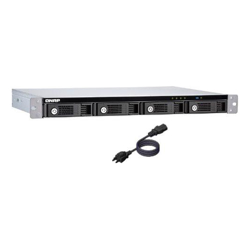
[TR-004U] Qnap 4-BAY 3.5 SATA HDD USB 3.0 TYPE-C Hardware RAID RACKMOUNT

Qnap 4-BAY 3.5 SATA HDD USB 3.0 TYPE-C Hardware RAID RACKMOUNT Click image for larger image.

Product may vary from image. Rely only on description for purchasing decisions.
shadow
Our Price:
$738.89
(Inc. GST)
Availability:

Est. Delivery:
1-3 days
Brand:
Man. Part #:
TR-004U
Our Part #:
TR-004U
Calculate Delivery Cost
Postcode:
Please enter a postcode to caculate shipping prices.
shadow
Product Quantity:
QNAP TR-004U, 2.5/3.5", Black, Grey

The TR-004U USB 3.0 RAID expansion enclosure allows you to expand the capacity of your QNAP NAS and PC. The TR-004U can also be utilized as a DAS (Direct-attached Storage) device, allowing you to directly access its content by connecting it via USB. The TR-004U features four 3.5-inch SATA drive bays with multiple RAID configuration options and USB 3.0 Type-C connectivity to bring you a highly-reliable and secure storage capacity expansion solution.

Supports various RAID levels
The TR-004U supports a variety of RAID configurations. Depending on your requirements, you can switch between hardware- or software-controlled RAID modes. Move the DIP switches to corresponding positions for your ideal RAID mode: Individual, JBOD, RAID 0, RAID 1/10 or RAID 5. You can also configure the RAID settings from your QNAP NAS, or by using the QNAP External RAID Manager utility on your computer.

Individual Mode
Treats every disk as separate storage spaces, allowing you to independently access each one.

JBOD Mode
All the disks are recognized as a single drive. This allows maximal storage utilization but provides no data protection.

RAID 0 Mode
Data is split amongst the drives. RAID 0 provides the fastest performance but does not protect data from drive failure.

RAID 1/10 Mode
Half of the total storage capacity is used to store data, and the other half keeps a copy of this data. This provides high data protection at the cost of only being able to use half the installed storage space.

RAID 5 Mode
RAID 5 requires at least three drives to use and parity information is distributed among the drives, providing optimized storage capacity and protection against one disk failing.

Software Ctrl Mode
Use this mode to control the RAID configuration from your NAS or computer.

Flexible storage configuration and management
Compared with other RAID enclosures, the TR-004U provides software-controlled configurations for greater management flexibility. Users can configure RAID and monitor disk health using the Storage & Snapshots Manager on a QNAP NAS, or by using the QNAP External RAID Manager utility on their computer.

Versatile usage scenarios to meet storage expansion needs
The TR-004U meets many storage expansion requirements for home and work use, including:

Scenario 1: Expand the capacity of your NAS
The TR-004U provides an alternative method for users to expand their rackmount NAS storage capacity. By connecting the TR-004U to their NAS and using the Storage & Snapshots Manager, users can easily configure and manage their storage expansion. The TR-004U supports a variety of QNAP NAS storage and file management functions, allowing users to build storage pools, find files with Qsirch and organize files with Qfiling.

Use the TR-004U as an alternative to conventional NAS expansion enclosures
As an external hardware RAID device, the TR-004U operates independently and does not require additional NAS system resources. When compared with the UX-500P expansion enclosure, the TR-004U uses less NAS system resources.

Scenario 2: External storage for your NAS
Instead of using the TR-004U to expand the capacity of your QNAP NAS, you can use it as a complimentary storage unit for backing up or moving data. It also allows you to physically migrate huge data collections that would require significant network bandwidth. While connected to the NAS, you can monitor the health and status of the TR-004U by using the Storage & Snapshots Manager on the NAS.

Scenario 3: Expand the storage space of your computer and server
The TR-004U can quickly add storage space to your computer and server. You can use the DIP switch to configure a hardware RAID mode or manage it by using the QNAP External RAID Manager utility. The health and status of the TR-004U can also be monitored by using the QNAP External RAID Manager utility.
*The QNAP External RAID Manager requires Windows 7 (or later), Windows Server 2012 R2 (or later) and macOS 10.13 (or later).

Scenario 4: Cross-platform file sharing
From your NAS to Windows, Mac, and Linux computers, the TR-004U is compatible with a wide range of devices. This makes it ideal for quickly moving large files between different devices. The TR-004U is even compatible with devices that use the exFAT file system*, adding further convenience for accessing and sharing files from a wider range of devices.
*To access devices that use the exFAT file system, users must purchase a separate exFAT driver license.
Storage
Number of storage drives supported
How many storage drives can be fit into the product at once.
4
Storage drive size
The size of the storage drive, given in inches ('').
2.5/3.5"
Supported storage drive interfaces
Serial ATA II, Serial ATA III
RAID levels
RAID is a storage technology that combines multiple disk drive components into a logical unit for the purposes of data redundancy and performance improvement. Data is distributed across the drives in one of several ways, referred to as RAID levels, depending on the specific level of redundancy and performance required.
0,1,5,10
Ports & interfaces
USB connectivity
The product has USB connector.
Y
Design
Product colour
The colour e.g. red, blue, green, black, white.
Black, Grey
Weight & dimensions
Width
The measurement or extent of something from side to side.
439 mm
Depth
The distance from the front to the back of something.
291 mm
Height
The measurement of the product from head to foot or from base to top.
44 mm
Operational conditions
Operating temperature (T-T)
The minimum and maximum temperatures at which the product can be safely operated.
0 - 40 °C
Operating relative humidity (H-H)
5 - 95%
Manufacturer Info
Authorised Apple Reseller