To find the right Consumables for your Printer use the search below with your Printer Model or Cartridge Part # .
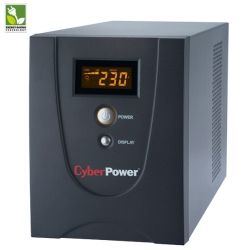 Click image for larger image.
Extra Remarks: Warranty : 2 Years Advance Replacement including Internal Battery
The Value SOHO Series UPS offers home and small office users clean and stable battery backup while the featured RJ11/RJ45 port ensures phone, fax, and modem lines are protected from surges. With Automatic Voltage Regulation (AVR) stabilizes the AC signal and maintains a safe voltage, this allows the UPS to maintain safe power levels for the connected equipment without resorting to battery power. The multifunction LCD readout provides immediate access to precise information of critical power/battery condition.
The included PowerPanel® Personal Edition management software showcases the feature rich abilities such as input/output power voltage readings, self-diagnostics, scheduled-shutdown, and approximate battery backup time.
PowerPanel® Personal Edition software is included with many of the CyberPower UPS products. This exclusive software allows control and monitoring of your UPS to provide protection for your computer system, components, peripherals, and most importantly, your data. In the event of a power loss, PowerPanel® will even automatically save your files and safely shutdown your computer in an intelligent and orderly matter.
The screenshots below will give you a better idea of the functionality and power of our software, and also give you a first-hand look at the various options and configurable settings. PowerPanel's intuitive Dashboard design is extremely easy to navigate for first-time users, and powerful enough for technical users and system integrators.
PowerPanel® is included Free with all our UPS systems and compatible with Windows 2000, Server 2003, XP 32/64, Vista 32/64, and Server 2008.
Power Source: This icon indicates whether the CyberPower UPS is providing AC utility Power or Internal Battery Power.
Battery Capacity: Indicates the current state of the Internal Battery. If the battery is not 100% charged the CyberPower UPS will charge it automatically.
Estimated Runtime: Indicates the expected runtime based on current battery capacity and load. Lower Loads will result in longer runtimes.
Monitor: View the current status of the UPS system vitals.
Configure: Allows the user to configure the device to personal preferences: system notifications, voltage options, runtime settings, and self test settings.
Help: View version information and access the help file.
Electrical power supplied by: Indicates whether the CyberPower UPS is providing AC utility power or internal battery power.
Voltage supplied: Indicates the voltage being supplied by AC utility Power, or if the unit is correcting for an adverse voltage condition.
Voltage condition: The current status of your AC utility power (Normal, Power Outage, etc.).
Remaining Capacity: Condition of the internal battery. If the battery is at 100%, the CyberPower UPS will automatically charge the UPS.
Battery Status: Displays the current state of the internal battery: Charging, Fully Charged, Discharging.
Remaining Battery Runtime: Indicates the expected runtime [if there was a power loss] based on current battery capacity and load.
Battery Backed Up Load: Displays how much capacity or head-room is left on the UPS unit. This is determined by the current load of the connected electronics. (Not available on the CP485SL or CP550SL).
Last Power Event: Informs the user of the nature of the most recent power event and how the CyberPower UPS corrected it.
Power Condition Summary: Displays the number of times adverse power conditions were experienced and the cumulative duration of the events.
Display Period: Configurable option that allows the user to display the period described by the Power Condition Summary. Can be adjusted to 1, 4, 12, or 24 weeks.
Enable PowerPanel® notification sounds: Toggle audible notifications via your computer’s speakers.
Enable Alarms at all times: This setting will cause the internal speaker in the CyberPower UPS to beep in response to adverse power conditions.
Disable Alarms at all times: This setting will prevent the CyberPower UPS from beeping in response to adverse power conditions.
Disable alarms when this computer is shut down: With this setting selected, the CyberPower UPS will only beep when your computer is turned on.
Disable alarms between: Can be adjusted to specify additional times when the CyberPower UPS should not beep.
Keep Computer Running: Select this option for maximum runtime. User adjustable between 5 and 8 minutes.
Preserve Battery Power: Select this option for minimum battery use. User adjustable between 1 and 5 minutes.
Normal AC utility voltage: Ideal voltage supplied by your AC Utility Power.
Current voltage: Actual voltage supplied by your AC Utility Power. This will constantly fluctuate as electrical devises are turned on and off in your building and the buildings near you.
Date of last self-test: Date the self test was last performed.
Result of last self-test: Outcome of the most recent self test.
Initiate self-test: The UPS will temporarily go offline and test the condition and effectiveness of the internal battery. It is recommended that users perform this test once a month.
Version: Software version number.
Hardware Information: Model Name of the of the CyberPower UPS as well as the firmware version and power rating.
Web Support Information: Links to pages on the CyberPower Systems (USA) inc. website. Clicking here will open a web browser window and navigate the user to the CyberPower homepage.
System tray popup notifications will appear when the UPS unit experiences a power loss, and once again when the unit's AC power is restored to normal operation.
| Features | Description |
| Model | VALUE2200ELCD |
| Capacity (VA/Watts) | 2200VA/1320W |
| Energy-Saving Technology | Yes |
| Input | |
| Frequency Range | 47 ~ 63 Hz (Auto Sensing) |
| Input Plug Type | IEC 320 C14 |
| Output | |
| UPS Outlets (Numbers) | (4) AU Outlets |
| On Battery Output Voltage | Simulated Sine Wave at 230Vac +/- 5% |
| On Battery Output Frequency | 50Hz/60 Hz +/- 1% |
| Transfer Time (Typical) | 4ms |
| Overload Protection | On Utility: Fuse & Internal Current Limiting/On Battery: Internal Current Limiting |
| AVR | Yes |
| Surge Protection and Filtering | |
| Surge Protection | Yes |
| Physical | |
| Dimensions(H x W x D)(mm) | 180 x 140 x 326 |
| Weight(kg) | 14.5 |
| Battery | |
| Sealed Maintenance Free Lead | 12V 9AH x 2 |
| Acid Battery | |
| Typical Recharge Time | 8 Hours |
| Runtimes | |
| Half-load/Full-load (mins) | 41313 |
| Status Indicators | |
| Indicators | Power On/Using Battery |
| Audible Alarms | On Battery, Low Battery, Overload |
| Multi-Function LCD Readout | Yes |
| Communication | |
| Power Management Software | PowerPanel® Personal Edition |
| Management | |
| Self Test | Yes |
| Auto-Charge/Auto-Restart | Yes |
| Connectivity Ports | USB, Serial |